A free spam blocker app can screen most robocalls before your phone ever rings.
Four apps own the US stores, and their free tiers are nowhere near equal.
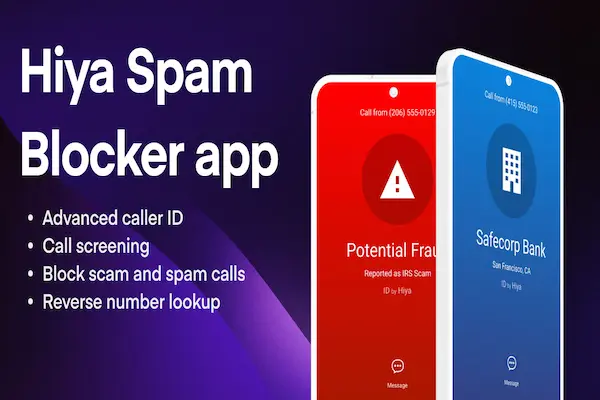
Read on to see which one to install tonight and how to switch it on.
Which free spam blocker app blocks the most robocalls
Hiya is the free spam blocker app most people should install first, because its caller ID and spam blocking run without a card and without a trial clock ticking. Truecaller is the closest free alternative, while Robokiller and Nomorobo put almost everything behind a subscription after a short trial.
| App | What you get without paying |
|---|---|
| Hiya | Caller ID, spam blocking, number lookups |
| Truecaller | Caller ID and blocking, with ads |
| Robokiller | Free trial, then a paid membership |
| Nomorobo | Free trial, then $2.99 a month |
The ratings back the shortlist. On the US App Store, Hiya, from Hiya Inc, holds 4.5 stars across about 238,000 ratings, and Truecaller, from True Software Scandinavia AB, holds 4.4 stars across about 252,000 ratings. Robokiller sits at 4.5 stars with roughly 414,000 ratings, and Nomorobo at 4.5 stars with about 22,000. On Google Play, Hiya shows 4.0 stars, 263,000 reviews and more than 10 million downloads.
Popularity is not the same as fit, though, and the gap between these apps only becomes obvious once you see what a week of screened calls actually looks like.
DOWNLOAD AND PROTECT YOUR PHONE
What changes in your week when the calls stop landing
You stop losing attention to calls you were never going to take, and that is a bigger change than it sounds.
Count the interruptions first. Hiya surveyed more than 12,000 consumers in six countries for its State of the Call research and found that Americans average 9.9 unwanted calls a week, which passes 500 a year. The same study reports that 86% of unidentified calls go unanswered, so most of those rings buy nobody anything.
The risk is what moved. One in four Americans in that survey said a deepfake voice call reached them in the past 12 months, and adults aged 55 and over lose an average of $1,298 to phone scams, triple what younger adults lose. Hiya also flagged 13.7 billion suspected spam calls in a single quarter of its Global Call Threat Report, roughly 150 million a day.
A screened phone breaks that chain early. The known bad numbers never reach your ear, the unknown ones arrive with a label, and you get to decide with information instead of guessing at the third ring.
⚠️ Careful: never call back a number from a missed call that claims to be your bank. Dial the number printed on your card instead.
What a free spam blocker app gives you before the paywall
The free layer of every serious app covers identification and blocking, and the subscription covers screening and voice analysis.
Prices start where the automation starts. Hiya lists Premium in the App Store at $3.99 a month, $9.99 a quarter or $24.99 a year, and adds call screening, AI voice and deepfake detection and live fraud warnings, with those three features currently limited to the United States and Canada. Truecaller Premium is listed at $9.99 a month or $74.99 a year, and Nomorobo at $2.99 a month or $19.99 a year. Robokiller has no permanent free tier and advertises stopping up to 99% of robocalls and spam texts, a vendor claim rather than an independent result.
Money aside, one free move sits outside the app stores entirely, and skipping it leaves a gap no subscription can close.
The free registry that works next to your app
Adding your number to the National Do Not Call Registry at donotcall.gov cuts legal sales calls, and it costs nothing.
The Federal Trade Commission runs the registry and states that signing up a home or cell number is free and that the registration never expires. Your number appears on the list the next day, and sales calls can take up to 31 days to stop.
The limit matters as much as the benefit. The FTC is direct about it: the registry only works on real companies that follow the law, and it will not stop scammers making illegal calls. That is precisely the traffic an app is built to catch, which is why the two belong together rather than one replacing the other.
With the registry handled, the app side takes about five minutes on either phone.
How to set up a free spam blocker app step by step
Before you start, update your phone software and make sure you are signed in to the App Store or Google Play with your own account.
- 1Open the official store on your phone, the App Store on iPhone or Google Play on Android, and search the app by name.
- 2Check the developer name on the listing before you tap install, so a copycat app does not get your call data.
- 3Grant the call permissions the app asks for. On iPhone this happens in Settings, under phone call blocking and identification.
- 4Choose how strict to be. Labeling unknown callers is the safe default; silencing them entirely is for people who never take cold calls.
- 5Add your allow list with the clinic, the school, the pharmacy and your workplace, so nothing important lands in voicemail.
- 6Report the ones that slip through. Every report you file sharpens the database that protects everyone using the same app.
Two mistakes undo all of it. Turning off the permission during an app cleanup silently stops the blocking, and installing an app file from a website instead of a store hands your call log to whoever built that file. If the volume of junk calls does not drop within a week, check the permission screen first and your strictness setting second.
Frequently asked questions about free spam blocker apps
These are the doubts that come up most often once the app is on the phone.
Is there a free spam blocker app that really works?
Yes. Hiya and Truecaller both keep caller ID and spam blocking in their free tiers, with no trial deadline. They cut the volume of junk calls sharply, but no app catches every call, because scammers switch to fresh numbers constantly.
What is the best free spam blocker app for iPhone?
Hiya is the usual pick on iPhone, because it plugs into the call blocking and identification screen in Settings and works from the free tier. Truecaller does the same job with ads, and both install straight from the App Store.
Will it block a call from my doctor or my employer?
Only if that number is unknown to your phone and the app is set to silence unknown callers. Save the numbers you cannot miss in your contacts or put them on the allow list, and they keep ringing normally.
How is this different from my email spam filter?
An email filter sorts messages after they reach your mailbox. A phone spam blocker checks a live call while it is still connecting, then labels it, silences it or sends it to voicemail. Different channel, different moment, so one never covers the other.
Which app helps most with international spam calls?
Truecaller has the widest reach outside the United States and says it is trusted by over 500 million users, which usually means better identification of foreign numbers. Hiya covers the US and Canada with its screening tools, so test both if the calls come from abroad.
Do I need to pay to stop AI voice scams?
Voice and deepfake detection sits in the paid plans today, so the free tier will not analyse the speech on a live call. It still blocks the flagged numbers those campaigns use, which stops a good share of them at the door.
Why this guide sticks to tools you can test for free
Harmonia Soul exists to make useful tools reachable for people who cannot try three subscriptions to find out which one works.
So the shortlist here starts from what a free account actually does, names the price of every upgrade, and separates a company’s advertising from a measured result. The prices and features above come from the current App Store and Google Play listings, and the call volume figures come from Hiya’s own published research.
That is also why the registry step sits next to the app step. One is a federal list you join once, the other is software you keep. Together they cost nothing and they cover different halves of the problem.
Turn on protection before the next robocall
Install one app tonight, allow it to see incoming calls, and add three numbers to your allow list. Ten minutes of setup is what separates a phone that interrupts you from one that filters for you.
DOWNLOAD AND PROTECT YOUR PHONE
ℹ️ Important: this content is informational and independent. We have no relationship with, sponsorship from or control over Hiya, Truecaller, Robokiller, Nomorobo, Apple, Google, the Federal Trade Commission or any phone carrier. Prices, features and free trials change, so confirm them on the official app store listings and at donotcall.gov before you decide. Download apps only from the official stores.
