The Hiya spam blocker app labels and blocks junk calls from its free tier, with no card.
Premium adds call screening and AI voice detection, and the price is public.
Below you get the tier comparison and the exact setup on both phones.
What the Hiya spam blocker app does on your phone
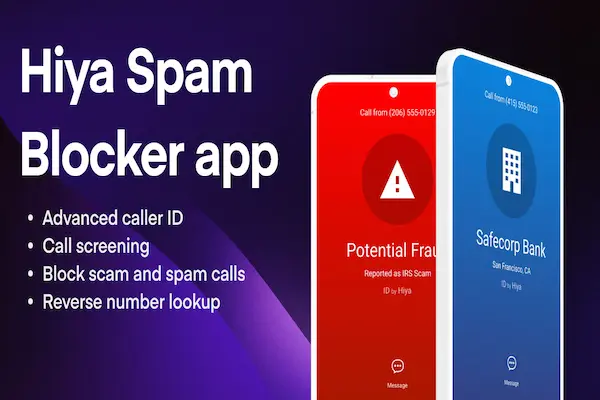
The Hiya spam blocker app identifies unknown callers and blocks the numbers already tied to spam and fraud, and both of those jobs happen in the free version. Hiya Inc built it around a shared pool of phone intelligence, so a number reported in one city can be flagged for you minutes later.
Three things arrive with the install. Caller ID fills in who is behind numbers you never saved. Spam and robocall blocking keeps the flagged ones from reaching you. Number lookup lets you type a number that called and see what other people reported about it, which is useful when a missed call claims to be a delivery company.
Reception matches that. On the US App Store the app holds 4.5 stars across roughly 238,000 ratings, and on Google Play it shows 4.0 stars with 263,000 reviews and more than 10 million downloads. Those are the store numbers as published today, not a vendor promise.
Solid ratings still leave one question open, which is why anybody needs a second layer on top of a phone that already shows the number calling.
Why unknown numbers deserve a second opinion
The number on your screen is no longer proof of anything, because spoofing lets a caller borrow a local area code or a company’s real line.
Voice cloning pushed this further. In Hiya’s own State of the Call survey, one in four Americans said a deepfake voice call had reached them within the previous 12 months. The same research found 86% of unidentified calls go unanswered, which tells you how little trust is left in a bare number.
Picture the version of that call you would actually fall for. A voice that sounds like your credit union, a story about a charge you did not make, and a request to confirm a code. Nothing about the screen warns you, because the screen only ever showed ten digits.
A label changes the order of events. You see the warning before you hear the voice, and you decide while you are still calm rather than 40 seconds into a script written to rush you.
🚫 Never do this: no legitimate bank, agency or carrier asks you to read back a security code over the phone. Hang up and call the number on your statement.
Hiya free against Hiya Premium, side by side
Free covers identification and blocking; Premium covers screening, voice analysis and live fraud warnings.
| Feature | Free | Premium |
|---|---|---|
| Caller ID | Yes | Yes |
| Spam blocking | Yes | Yes |
| Number lookup | Yes | Yes |
| Call screening | No | Yes, US and Canada |
| AI voice detection | No | Yes, US and Canada |
| Live fraud alerts | No | Yes, US and Canada |
The App Store listing prices Premium at $3.99 a month, $9.99 a quarter or $24.99 a year, and it also lists a separate Lookup Plan at $2.99 a month for people who only want number searches. Call screening, AI voice detection and fraud detection are noted as available in the United States and Canada only, so a reader outside those two countries pays for less than the full list.
Worth saying plainly: nothing here blocks every call. Premium raises how many suspicious calls get handled automatically, and even then a brand new number with no history behind it can still ring once before anyone flags it.
Those extra tools also need access to your calls, which is the part most people skim past and later regret not reading.
Permissions and privacy: what you are agreeing to
A call blocker has to see incoming numbers to work, so the permission it asks for is real and worth understanding before you tap accept.
Two habits keep you in control. Cancel a trial from your Apple or Google account settings rather than inside the app, because that is where the renewal actually lives. And skip any contact sync you do not need, since the blocking works from the shared number database either way.
With the terms clear, the install itself is short. Five minutes is a realistic estimate on either platform.
How to install the Hiya spam blocker app step by step
Have your phone updated and your store account signed in, and keep the phone unlocked for the permission prompts.
- 1Search the store by name. Open the App Store on iPhone or Google Play on Android and look for the listing published by Hiya Inc.
- 2Install and open it once. The first launch is what registers the app with your phone system so the next step becomes available.
- 3Turn on the system toggle. On iPhone, open Settings, find the call blocking and identification screen, and enable the app there. On Android, allow the caller ID and screening permission when prompted.
- 4Pick your blocking level. Warning labels only, or automatic blocking for numbers already tied to fraud. Start with labels for a week and tighten after that.
- 5Protect the numbers you need. Save your pharmacy, clinic, school and workplace in your contacts so nothing important gets screened out.
- 6Report what gets through. Marking a call as spam feeds the shared database, which is the reason the free tier keeps improving.
When people say it is not working, the cause is almost always step three. The app installs fine, the system toggle stays off, and nothing gets checked. Open that screen and confirm the switch is on. If you also run another caller ID app, turn one of them off, because two blockers competing for the same call produce odd results.
Frequently asked questions about the Hiya spam blocker app
Short answers to what readers ask most about this app specifically.
Is the Hiya spam blocker app free to use?
Yes, the app is free to download and the free tier includes caller ID, spam and robocall blocking and number lookup. Premium is optional and priced separately on the store listing, so you can run the free version indefinitely.
How much does Hiya Premium cost?
The App Store lists Premium at $3.99 monthly, $9.99 quarterly and $24.99 yearly, plus a $2.99 monthly Lookup Plan. Store prices change, so read the current listing before you subscribe and check the trial terms attached to it.
Does it work on iPhone and on Android?
Both. The iPhone version depends on the call blocking and identification setting inside Settings, while the Android version asks for caller ID and screening permission when you open it. The blocking itself behaves the same way afterwards.
Can it detect an AI generated voice?
AI voice detection and live fraud alerts belong to Premium and, per the store listing, run in the United States and Canada only. The free tier still blocks numbers already linked to those campaigns, which stops many of them before a voice is heard.
Will it block calls I actually want?
Saved contacts are not screened, so the risk sits with unknown numbers you were waiting for, like a callback from a clinic. Keep the setting on warning labels until you trust the results, and save important numbers first.
Where should I download it from?
Only the App Store or Google Play. An app with access to your incoming calls should never come from an installer file on a random website, and no legitimate page charges you money to release a free download.
How we checked the details in this guide
Every price, rating and feature limit above was read off the official store listings rather than copied from a press release.
Harmonia Soul writes for readers who need a tool that works on the phone they already own, without a subscription to find out. So the free tier gets described in full, every paid feature carries its price and its country limit, and the survey figures are attributed to the company that published them.
When a detail can change without notice, and app prices change often, we say so instead of presenting it as permanent. That is the difference between a guide you can act on and a page that ages badly.
Get set up before the next unknown call
Install it, switch on the system toggle, and save your three most important numbers. Five minutes now buys you a phone that tells you who is calling before you pick up.
ℹ️ Important: this content is informational and independent. We have no relationship with, sponsorship from or control over Hiya, Apple, Google, Samsung or any phone carrier mentioned, and we receive nothing from them. No app blocks every unwanted call. Prices, features, country availability and trial terms change, so read the current store listing, the privacy policy and the subscription terms before you subscribe.