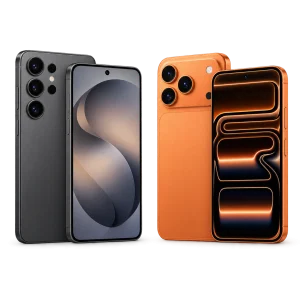
Hoping to get an iPhone 16 Pro Max through Lifeline?
Here is what the federal benefit really pays for.
The answer surprises most people, and it can still save you money on your phone bill every single month.
Read on to see who qualifies, how to apply and which providers deliver the benefit near you.
Does Lifeline pay for an iPhone 16 Pro Max?
No. Lifeline does not hand out an iPhone 16 Pro Max, or any other flagship phone, as part of the federal benefit. The program lowers the monthly price of phone service, internet service or a bundle, and the money goes to the bill, never to the device.
Lifeline is managed by the Universal Service Administrative Company, known as USAC, under the oversight of the Federal Communications Commission, the FCC. Its mission since 1985 has been simple: keep low-income households connected to work, school, doctors and emergency services. Subsidizing premium hardware was never part of that mission.
| What you get | How much |
|---|---|
| Standard Lifeline discount | Up to $9.25 a month |
| Tribal lands discount | Up to $34.25 a month |
| Standard savings per year | Up to $111 |
| Tribal savings per year | Up to $411 |
| Premium handset | Not covered |
Now compare those numbers with the phone. Apple launched the iPhone 16 Pro Max at $1,199 for the base storage option. Even the full Tribal discount, added up over twelve months, would cover roughly a third of that price, and the standard discount covers less than a tenth. The math alone explains why no participating carrier can give this model away inside the program.
Some providers do include a free phone when you sign up. Those phones are almost always entry-level Android models picked because they cost little and handle the basics well: calls, texts, maps, email and video chats. They are a commercial offer from the company, not a right that comes with your approval.
So the smart way to look at the iPhone 16 Pro Max through Lifeline question is to flip it around. Lifeline will not buy the phone, but it can shrink the recurring cost of using a phone you already own. The next section shows who can claim that discount.
See the official Lifeline rules
Who qualifies for the Lifeline discount?
You qualify for Lifeline in one of two ways: your household income is at or below 135% of the Federal Poverty Guidelines, or someone in your household takes part in a qualifying federal assistance program. Meeting either one is enough.
Qualifying by income
The official income table on lifelinesupport.org sets the yearly limit at $20,331 for a single person and $42,120 for a household of four in the 48 contiguous states and the District of Columbia. Alaska and Hawaii use higher limits, so residents of those states should check their own column. The table is updated every year, so confirm the current figure before you apply. Proof can be a tax return, three pay stubs in a row or a Social Security benefits statement.
Qualifying through a program
An award letter, a benefit statement or another official notice from the program is the usual proof. A child or dependent enrolled in one of these programs also qualifies the whole household, a detail many applicants miss.
The one per household rule
Only one Lifeline benefit is allowed per household. For the program, a household means people who live at the same address and share income and expenses. Two roommates with fully separate finances can each apply, while a married couple cannot get two discounts.
Eligibility is confirmed by the National Verifier, the federal system run by USAC. It checks your details against government databases and asks for documents only when it cannot confirm you on its own. Once you know which route fits you, the application itself is short.
How to apply for Lifeline step by step
You apply for Lifeline through the National Verifier at getinternet.gov/apply, then choose a participating provider to apply the discount to your plan. The whole process is free, and it moves fast when your documents are ready.
Before you begin, set aside a photo ID, proof of your address and the document that proves your eligibility route. Have the last four digits of your Social Security number or your Tribal ID number at hand.
- 1Confirm your route by checking the income table or the list of qualifying programs on lifelinesupport.org.
- 2Collect your proof and photograph each page flat, in good light, with all four corners visible.
- 3Open the National Verifier application and type your legal name, birth date and address exactly as they appear on your documents.
- 4Upload the documents requested if the system cannot confirm you automatically, then submit the form.
- 5Track your result by signing back in, since a review can take from a few days to a few weeks.
- 6Pick a participating provider that serves your address and ask it to apply the discount to your chosen plan.
Two slip-ups cause most delays. The first is a name that does not match your records, such as a nickname or an old married name. The second is a second application from someone else in the same household, which the system flags right away.
After approval, the benefit is not permanent. You must recertify once a year, and a free Lifeline line has to be used at least once every 30 days. With approval in hand, the next choice is the company that will deliver the service.
Which providers offer Lifeline phones?
Lifeline reaches you through participating companies called eligible telecommunications carriers, and several of them add a free basic smartphone to the plan. Those phones are budget Android models, not premium devices like the iPhone 16 Pro Max.
The lineup changes by state and even by ZIP code. The companies near me tool on lifelinesupport.org lists the providers approved for your address, which is the only list that really matters for you. Names you will often see include:
Each company sets its own data allowance, coverage map and device policy. Before you enroll, ask four plain questions: which phone comes with the plan, is there any upfront fee or shipping cost, can I keep my current phone instead, and what happens if I switch later. Written answers protect you if the offer changes.
⚠️ Watch out: any ad promising a free iPhone 16 Pro Max through a government program is a red flag. Lifeline never charges a fee to apply, and no agent can unlock a premium phone for a payment.
If you already own an iPhone, ask about bring your own device. When the phone is unlocked and compatible with the network, you keep the handset you like and still collect the monthly discount.
Frequently asked questions about Lifeline and phones
These are the questions people ask most once they learn how the benefit works.
Can I use my own iPhone 16 Pro Max with Lifeline?
Usually yes. If the phone is unlocked and works on the provider’s network, you can bring it and apply the Lifeline discount to a compatible plan. Ask the provider to confirm compatibility before you switch.
Are there hidden fees with a free Lifeline phone?
The federal benefit has no fees. A provider may still charge for extra data, shipping or a device promotion, so read the plan terms and ask for any cost in writing before you enroll.
Can I upgrade my Lifeline phone to a premium model?
Only by paying for it yourself. Providers do not offer upgrade paths to flagship phones inside the program, so a move to an iPhone 16 Pro Max would mean covering the full retail price.
How often do I need to recertify for Lifeline?
Once a year. USAC runs the check in most states, while Oregon and Texas handle it themselves. Missing the deadline in the notice ends the discount, so answer it as soon as it arrives.
Does Lifeline cover home internet too?
Yes. You can apply the discount to phone service, home internet or a bundle that includes both, but only one discount per household. Pick the service your family uses the most.
Is the Affordable Connectivity Program still available?
No. The ACP stopped taking new enrollments and ended when its funding ran out. Lifeline is a separate, permanent program and keeps working normally for eligible households.
Making the most of your Lifeline options
Skip the hunt for a free flagship and claim what the program actually delivers: up to $9.25 off every monthly bill, or up to $34.25 on qualifying Tribal lands. That is real money that returns month after month.
Getting an iPhone 16 Pro Max through Lifeline is not on the table, because the program pays for service, not for devices. What is on the table is lower phone or internet costs for your household, a free basic smartphone from some providers, and the option to keep the phone you already own.
Check your eligibility today, apply through the National Verifier and compare the providers that serve your address. Then protect the benefit: use the line at least once a month and answer the yearly recertification notice on time.
Check your eligibility on the official site
ℹ️ Important: this content is informational and independent. en.harmoniasoul.com has no relationship with, sponsorship from or control over Lifeline, USAC, the FCC, Apple or any carrier mentioned here. Rules, amounts and contact details can change, so confirm every detail through the official channels before you act. No one should ever pay a fee to unlock a public benefit.